-
Shop
- Advanced Technologies
- AI Skills
- AI Skills for Creators & Freelancers
- AI Client Management
- AI Ethics
- AI Mindset
- AI Tools & Prompts
- AI Writing & Content Creation
- Audio, Voice & Music
- Design & Visual Creation
- Email, Messaging & Communication
- Freelancing & Business
- Marketing, Ads & Conversion
- Productivity, Workflow & Automation
- SEO & Search Optimization
- Social Media Content & Growth
- Strategy, Planning & Analytics
- Video Creation & Editing
- Apple Accessories
- Bathroom
- Beauty
- Best-Sellers
- Car Accessories
- Car Buying & Ownership
- Confidence
- Dating & Social Skills
- Digital Resources
- Education & Learning
- Family & Parenting
- Fashion
- Alexander McQueen
- Bags
- Balenciaga
- Blazers
- Bottega Veneta
- Brunello Cucinelli
- Burberry
- Chanel
- Chloé
- Dior
- Dolce & Gabbana
- Dresses
- Etro
- Fendi
- Gucci
- Jacquemus
- Jil Sander
- Kiton
- Luggage
- Miu Miu
- Off-White
- Outerwear
- Prada
- Rick Owens
- Saint Laurent
- Shoes
- The Row
- Tom Ford
- Valentino
- Valentino Garavani
- Versace
- Vivienne Westwood
- Fashion Accessories
- Furniture
- Gadgets
- Health & Beauty
- Health & Wellness
- Home Decor
- Home Electronics
- Home Styling & Organization
- Home Supplies
- Kids & Babies
- Kitchen
- Legend Footwear Brands Collection
- Lighting
- Luxury Brands Collection
- Online Business for Beginners
- Parenting & Child Development
- Patio, Lawn & Garden
- Personal Growth
- Personal Style & Fashion
- Pet Care
- Pet Lifestyle & Wellness
- Pet Supplies
- Pets
- Smart Amazon Shopping
- Smart Home Living Guides
- Super Deals
- Travel
- Travel & Adventure
- Wealth
- Wellness
- Popular
- Best deals
Foldable iPhone Tripod with Dual Cold Shoe Mounts
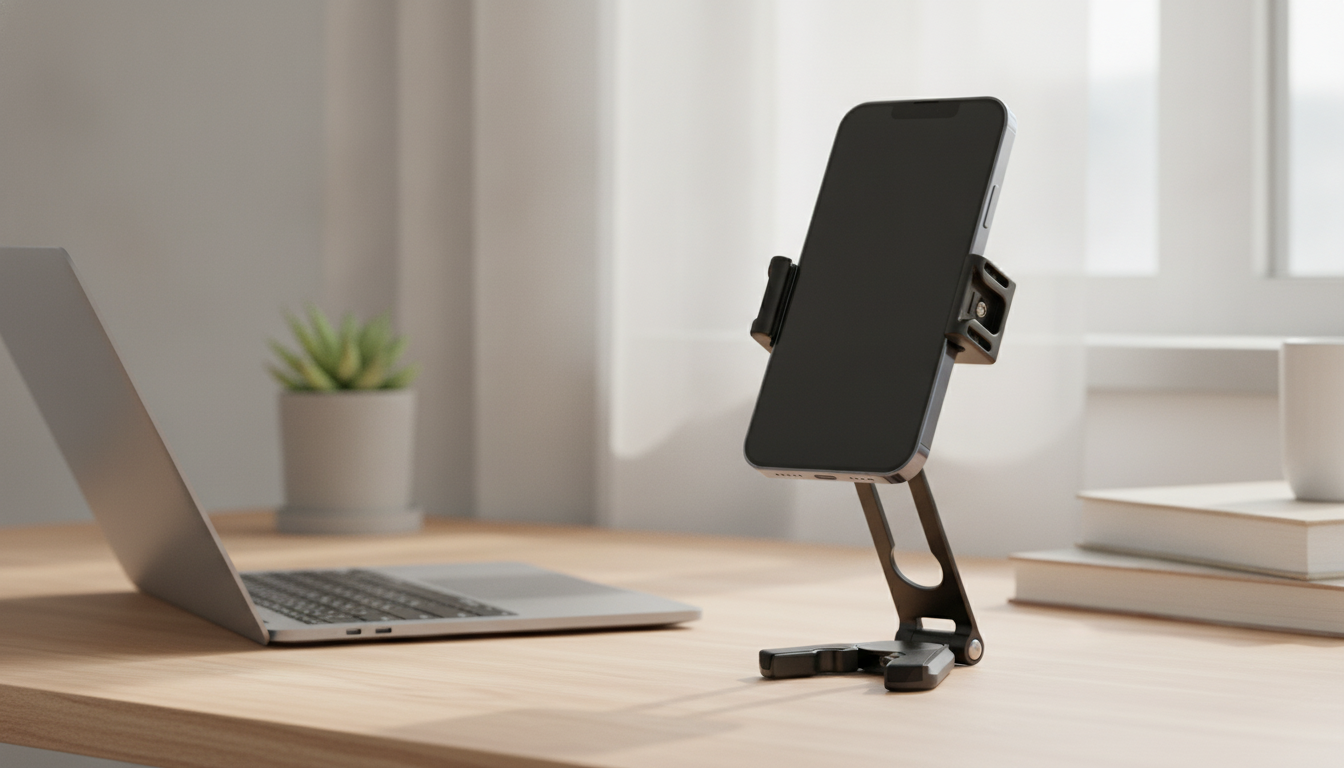
Foldable Portable Tripod with Dual Cold Shoe for Apple iPhone
A compact tripod should do two things well: travel easily and help you get a cleaner shot fast. The Foldable Portable Tripod with Dual Cold Shoe for Apple iPhone is designed for creators who move between handheld filming and steady, repeatable framing—without rebuilding their setup every time. The foldable body keeps your kit small, while the dual cold shoe mounts make it simple to expand beyond a “phone-only” rig with common add-ons like a microphone and an LED light.
What It’s Built For
This tripod is a practical fit for day-to-day iPhone creation where stability and speed matter more than a complicated stand. It’s especially useful when you need hands-free shooting or want your phone positioned consistently from take to take.
- Stable, hands-free shooting for video calls, tutorials, product demos, cooking, fitness, and travel clips
- Dual cold shoe mounts to attach two accessories at once (a common pairing is mic + light)
- Foldable design for quick pack-up and easy storage in a small bag
- Simple setup for iPhone creators who want a tidy, all-in-one shooting station
If you’re building content as a solo creator, the biggest win is repeatability: set your angle once, mark the spot on your desk, and your framing stays consistent across sessions.
Key Features That Matter on an iPhone Rig
iPhones can already produce excellent video, but your footage is only as usable as your stability, audio, and lighting. This tripod focuses on the parts of the rig that most directly affect watchability.
- Dual cold shoe mounting points for expanding beyond “phone-only” recording
- Portable, foldable frame for on-the-go filming
- Tripod base for steadier shots compared to handheld filming and improvised supports
- Best used on flat, stable surfaces for maximum steadiness, especially with accessories attached
For reference on iPhone model details (camera capabilities and device dimensions), Apple’s official specs library can be helpful when planning a setup: Apple Support — iPhone Technical Specifications.
Accessory Setups Using the Dual Cold Shoe
Cold shoes are a simple, proven way to mount accessories without adding electronics to the connection point. If you’re new to the term, a cold shoe is the non-electrical version of the camera “hot shoe” standard (overview here: Wikipedia — Hot shoe).
With dual cold shoe points, you can keep a compact “creator stack” together—reducing the need for separate stands or clamps that clutter a desk.
Common dual cold shoe combinations for iPhone creators
| Setup | Why it helps | Best for |
|---|---|---|
| Shotgun mic + LED light | Cleaner audio and consistent lighting in one compact rig | Talking-heads, reels, tutorials |
| Wireless mic receiver + LED light | Cable-free audio with simple on-camera illumination | Vlogging, interviews |
| LED light + small fill/bounce accessory | More flattering lighting control with minimal gear | Beauty, product close-ups |
| Mic + on-camera tally/mini light | Improves audio while signaling recording/adding subtle fill | Solo filming, streaming |
Whichever pairing you choose, keep accessory weight balanced. If one side is significantly heavier, the rig can feel “top-biased,” which may encourage tilt or wobble—especially on small tables.
When a Foldable Tripod Improves Video Quality
A tripod doesn’t just prevent shaky footage; it also makes your production flow smoother. The difference shows up most in everyday scenarios where lighting is less forgiving and your hands can’t stay perfectly still.
- Reduces micro-shake that can make footage look less polished, especially indoors or at night
- Helps maintain consistent framing across multiple takes, making edits smoother
- Supports hands-free shooting for longer recordings (classes, webinars, interviews)
- Pairs well with iPhone stabilization: stabilization works best when it’s not fighting heavy shake
For product demos or cooking clips, stability also helps viewers focus on what you’re showing—hands, tools, and ingredients stay in frame rather than drifting out of view.
Quick Setup Tips for Better Results
Small adjustments in setup tend to make a bigger difference than swapping to new gear. These steps help you get a cleaner take without slowing you down.
- Place the tripod on a solid surface and avoid soft furniture that can wobble
- Mount the phone, then add accessories one at a time to keep balance under control
- If using a light, angle it slightly above eye level for a natural look and fewer shadows
- Do a short test clip to confirm audio levels and that accessories aren’t in frame
- For desk recording, leave space behind the tripod so the phone can tilt without hitting a wall
Care, Travel, and Everyday Use
Product Snapshot
- Name: Foldable Portable Tripod with Dual Cold Shoe for Apple iPhone
- Price: $48.82 USD
- Availability: In stock
- A practical pick for creators who want a small tripod plus mounting options for two add-ons
More In-Stock Picks for Creators
- Foldable Portable Tripod with Dual Cold Shoe for Apple iPhone (portable filming base with dual cold shoe expansion)
- AI-Powered Brand Magic: Craft Your Freelance Style Guide Fast | Ebook (a helpful companion for creators refining a consistent look and voice)
FAQ
What is a cold shoe mount used for on a phone tripod?
A cold shoe is a non-electrical accessory mount that lets you attach items like microphones, LED lights, or wireless receivers. It provides a secure physical connection without sending power or data through the mount.
Can two accessories be mounted at the same time?
Yes—dual cold shoe points are intended to mount two accessories at once, commonly a microphone and a light. For best handling, keep the total weight reasonable and position accessories so the rig stays balanced.
Will adding a microphone and light make the tripod less stable?
It can, since extra weight and an uneven load may increase wobble or tilt. Using compact accessories, balancing the weight side-to-side, and placing the tripod on a firm, flat surface helps maintain stability—do a quick shake test before recording.












Leave a comment